How to Use the Calendar Greeting cards Feature – Complete Guide
How to Use the Calendar Greeting cards & send greeting cards on your calendar using templates, photos, doodles, text, auto play options, and scheduled delivery.
Digital Calender Greeting Card feature enables the user to make personalized cards and send them to Calendar Frame. It is easy to make the birthdays, anniversaries, achievements, and even ordinary moments personal. The feature is compatible with Calendar Frame version 3.6.0 and eCalendar App version 1.30.0. Anyone in the family can create a card within few steps with the help of easy editing tools. It is among the most entertaining and interactive characteristics of the eCalendar system.
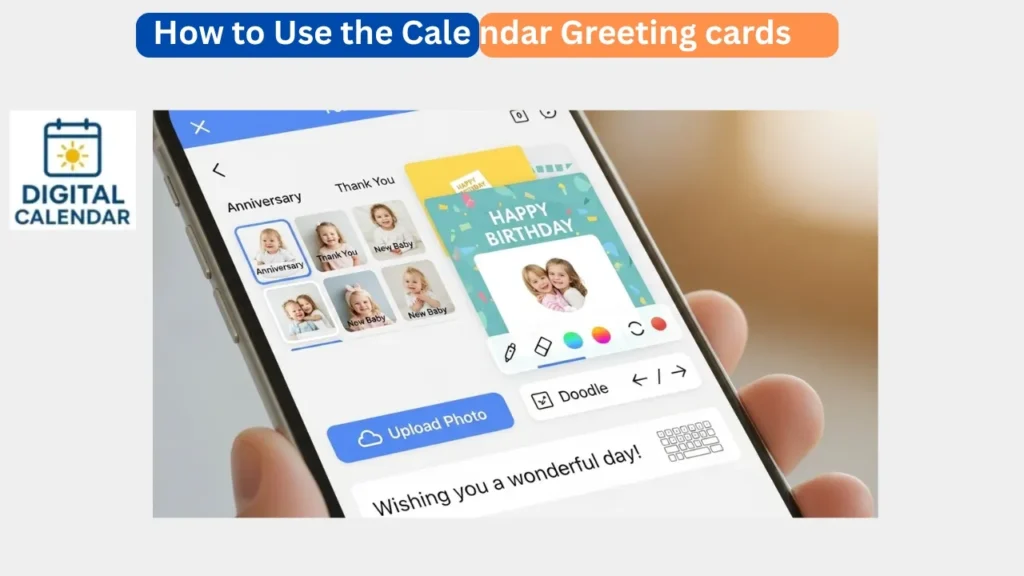
The greeting card application targets everyone and makes the process of communication more emotional and meaningful. It enables people to post pictures, write texts, use doodle tools, and select templates depending on the occasion. When the card is completed it would immediately be visible on the calendar leaving a pleasant surprise to the recipient. It is a natural process that is creative even to the first time. This renders the feature ideal among the families that love thoughtful digital messages.
Amazon Affiliate Disclaimer
https://digicalendars.com participates in the Amazon Services LLC Associates Program, an affiliate advertising program designed to provide a means for websites to earn fees by linking to Amazon.com and other affiliated sites. As an Amazon Associate, we earn from qualifying purchases made through the links on our website. This does not affect the price you pay your support simply helps us maintain the site and continue offering honest, valuable reviews and recommendations.
Module Introduction
The Greeting Card option allows you to show feelings graphically with the help of beautiful templates and personalized details. You are able to add personal photos, colorful doodles, or heartfelt text to the card. The interface is separated into simple parts and editing is easy even to children or the old family members. It also has autoplay and manual play option which can control the appearance of the greeting card on the Frame. You will be able to schedule cards to appear at the ideal time with the help of scheduling.
Sending a greeting card is not only a digital activity, but it is also a memory that the entire family shares. The card will automatically play on the calendar screen so that no one will miss the moment. You are able to send cards immediately or make them on birthdays or occasions. This feature is charming and convenient by virtue of this flexibility. This means that this tool is being used by a number of users to celebrate special occasions.
Best Digital Calendars
How to send a greeting card step by step?
Action 1: Activate the Greeting Card Feature
Open the eCalendar App and proceed to the home page where the major functions will be displayed. Click the Greeting Card button in order to design your card. This opens the editing interface without having to navigate through various menus. The button is well positioned in a convenient location. This makes the beginners able to begin at once.
Step 2: Edit Your Greeting Card
Upon opening the editing screen, you may select various templates that can be used in birthdays, holidays, love notes, thank-you messages, and so on. Touch the left hand side of the screen to insert a personal photo in your mobile gallery. Tap the right side to write or sketch using drawing tools. Such editing features will assist you in creating a personalized card that is characteristic of you. When you are ready, tap Next to approve your design.
Digital Calendars
Step 3: Create a Card Title
Here, the application will require you to add the title of your greeting card. The title will assist you identify the card after you have gone back to the card record. Select something valuable like Happy birthday mom or congratulations. Titles also assist in maintaining the history of your greetings. Having typed in the title, proceed to the next setting.
Step 4: Select either Autoplay or Play on Click
Now you have the option of the appearance of the greeting card on the Calendar Frame. Should you wish to play Autoplay, the card will automatically play once it is received. In the case of Play on Click, the card will be visible, but it will not play until someone taps it. This alternative assists in tailoring the level of interactivity that the card experience ought to possess. It is also possible to schedule the delivery-time when making surprises.
How to Use Digital Calendar’s Features – Complete Guide
How to Use Digital Calendar’s Features 2 – Complete Guide
Step 5: See Sent Greeting Cards
All your past greeting cards are also available by visiting Me Card Record in the app. This is where all the cards created and sent are stored. You are able to see what you have posted, what date it was sent out, and which template you used. It serves as your own electronic greetings journal to your online cards. This helps in the easy tracking of memories and it also prevents sending of the same message.
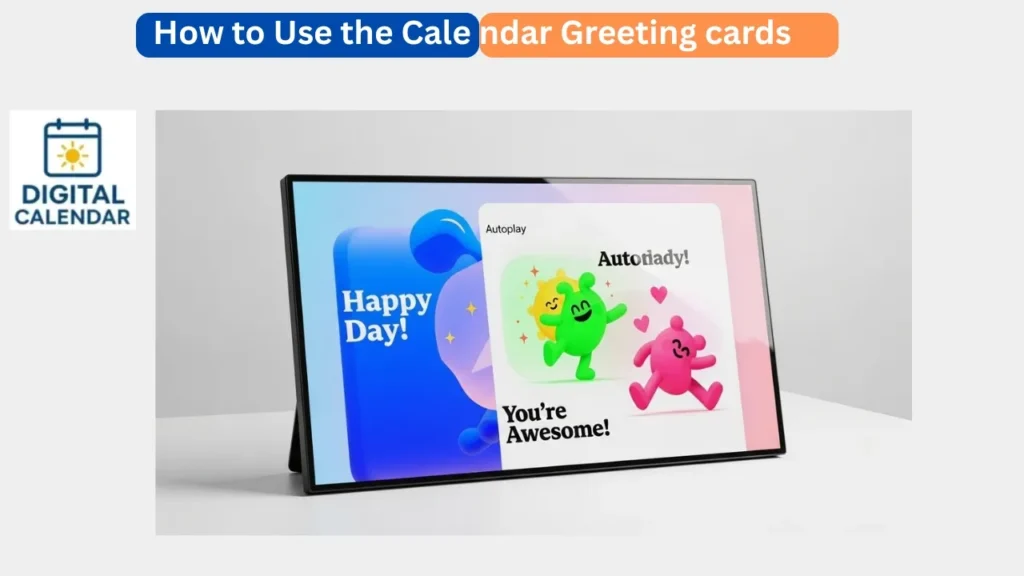
The Real-Time Greeting Card Playback
As soon as a greeting card is sent, it is immediately displayed on the Calendar Frame to everybody. The card displays animations, pictures and text in the way you made it to be. When the autoplay is turned on, then the card begins playing immediately, which makes it a comfortable and happy experience. This real time response is popular among the families as it gives vitality to the everyday communication. It is like placing a small party in the doorstep.
The live playback allows sharing of emotional moments immediately the card has been received. This renders the feature ideal in surprises in case you are not there physically. It could be a morning at a birthday or a greeting during a holiday or even a plain I miss you and the instant display makes it exciting. It brings the calendar closer to the individual and makes it more expressive. This is the reason why many users like sending cards on a regular basis.
Benefits of the Greeting Card Feature
Greeting Card will bring emotion and creativity to your online routine. It provides families a unique means of communication with each other in the form of visual messages. Every card appears clean and beautiful as the result of custom templates. Real time delivery makes sure that your message is delivered at the time you want it to be delivered. Planned delivery provides flexibility in surprises.
Greeting cards are also a good way of enhancing emotional ties in the family. Even such little messages as Good Morning or Have a Great Day are displayed as significant when they are displayed on the Calendar Frame. The feature promotes creativity among those children who love to doodle and draw. It also brings the calendar to life and is more interactive. This is the reason why the feature is popular among both young and old users.
Best Digital Picture Frames
FAQs – How to Use the Calendar Greeting cards
Conclusion
The Calendar Greeting Card feature is a strong and heartwarming feature that assists the user to show emotions in a creative way. It is fun and meaningful to create a greeting card with the help of customizable templates, photo uploads, doodles, and text. The Calendar Frame has a real-time playback which gives excitement and surprise to each message. Celebrations are even more memorable, even in your absence, through the options of scheduling. This aspect adds happiness, personalization, and closeness to life.