How to Sync a Yahoo Calendar – Complete Guide
Sync a Yahoo calendar with eCalendar using an ICS link to keep events unified, updated, and automatically shared across all connected devices.
You can also schedule all your events in a single digital calendar by synchronizing your Yahoo calendar with eCalendar so that you do not have to open different applications. Your Yahoo ICS link can be copied and sent to the email address of your calendar to allow synchronization of events. In this way, planning every day will be much easier, and appointments will not be missed. The process can be done by anybody within minutes. Use this guide to synchronize your calendar without any problem.
Best Digital Picture Frames
Step-by-Step Guide to Sync Yahoo Calendar
Step 1: Log In and Create an Event
You can start by logging in to your Yahoo mail account and clicking on the calendar. Add a new event to make sure your calendar is operational and working fine. This action is to make sure that the ICS connection has a minimum of one event that will be synchronized. A test event is useful in ensuring that syncing is taking place as required. When this is completed move to the next step.
Amazon Affiliate Disclaimer
https://digicalendars.com participates in the Amazon Services LLC Associates Program, an affiliate advertising program designed to provide a means for websites to earn fees by linking to Amazon.com and other affiliated sites. As an Amazon Associate, we earn from qualifying purchases made through the links on our website. This does not affect the price you pay your support simply helps us maintain the site and continue offering honest, valuable reviews and recommendations.
Step 2: Go to “My Calendar” and Edit
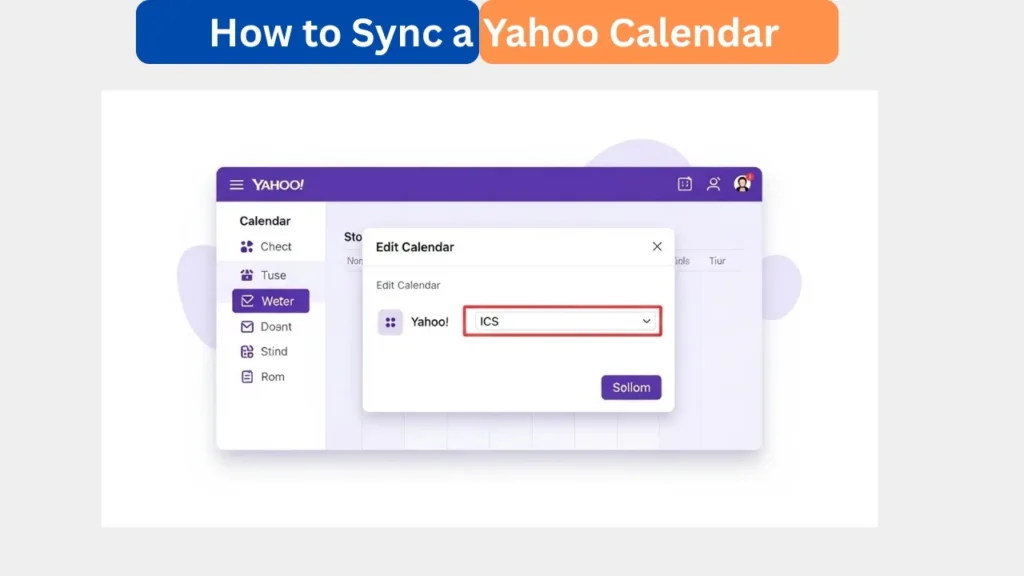
Click on My Calendar menu in Yahoo Calendar and in the menu, click on Edit Calendar to get into advanced settings. In this section, you can locate significant configuration settings such as the ICS connection that is used to sync. By editing, you are certain to choose the right calendar in case there are several calendars. Do not forget to check your choice. Proceed when confirmed.
Best Digital Calendars
Step 3: Copy the ICS Link
Within the Edit Calendar window, there will be an ICS subscription link that is shown to be externally synced. It is important to copy all the characters in the link so as to avoid errors. The ICS connection is an intermediary between eCalendar and the Yahoo Calendar. Maintaining the connection is a guarantee of the reliable syncing. Store it until later when it will be utilized in the next step.
Digital Calendars
Step 4: Email the ICS Link to the Calendar’s Email
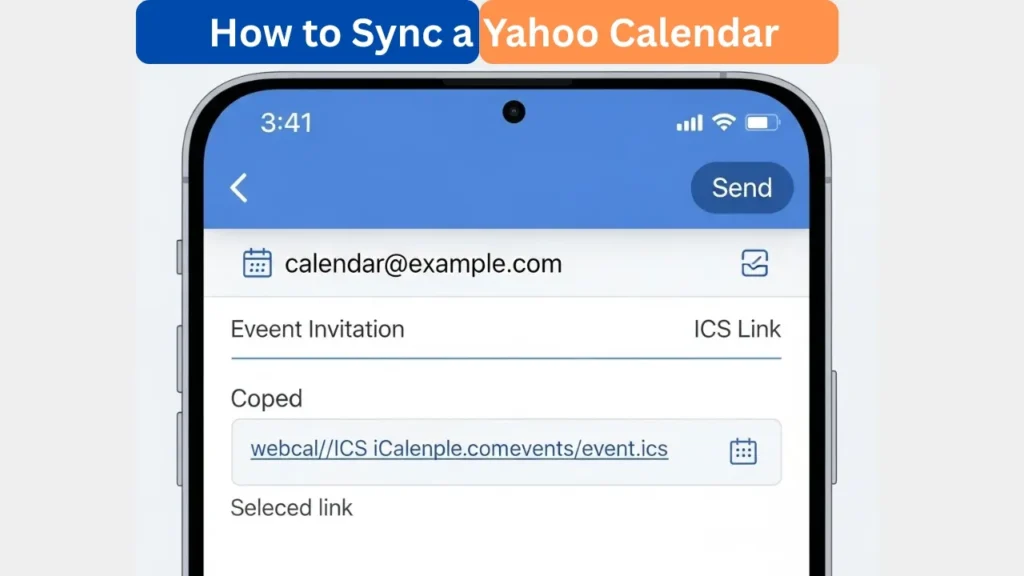
Go to Yahoo Mail and write a new message that will be sent to the calendar email address that is unique to your eCalendar. Copy the ICS link available and paste it in the email body and send it out. The email of the calendar is available in the Settings – General – Calendar Email. This link allows eCalendar to add your Yahoo schedule. Make sure that the email has been delivered.
Step 5: Sync Complete
After the email has been dispatched, the eCalendar system will automatically process the ICS link. It should only take some few seconds before your Yahoo event shows up in the calendar of the device. This is an affirmation of a successful integration of the two platforms. Any new items that are added to Yahoo Calendar will be updated using this subscription feed. Your calendars now have been synched.
How to Use Digital Calendar’s Features – Complete Guide
How to Use Digital Calendar’s Features 2 – Complete Guide
Benefits of Syncing Yahoo Calendar
The synchronization of your Yahoo calendar will ensure that all the schedules and appointments are placed in a single location, and it makes it easier and more organized to plan. This process removes the use of manual entries, which minimizes mistakes and wastage of time. The ICS syncing system is automated and updates events within the system, which makes it accurate across devices. The integration is convenient and reliable whether it is family planning or an individual schedule. It assists in the daily smooth coordination.
FAQs
Conclusion
It is easy, quick and efficient to sync your Yahoo calendar with e calendar. With the help of only a single ICS connection, you will be able to see all your events automatically on your device and keep them updated without any additional effort. The approach will avoid errors and manage your schedule on all platforms. Synced calendars facilitate day-to-day planning whether it is family planning or personal work. Begin syncing today in order to have a unified scheduling experience.